
With all the talk of Penguin update I came across this guy:
Data on the real google Penguin update coming in 🙂
With all the talk of Penguin update I came across this guy:
Data on the real google Penguin update coming in 🙂
Sadly google yesterday “started” rolling out it’s switch to https, the ssl search which does not pass the keyword data from the search results to your server.
Over 120% increase in Keyword (not provided) from my UK traffic
See this blog from yesterday http://www.seroundtable.com/google-ssl-worldwide-14836.html
Anyway … Here are the stats to show off the massive impact on UK Traffic keyword reporting:

As you can see the massive spike in the (not provided) keyword in my stats. This site 100% targets the UK market and has around 80% uk traffic.
 For 7 years now, year on year I go to a resort in Austria. Some 7yrs ago the resort was small and not to well known. Each year it has grown from strength to strength…
When I have sometime I’d like to blog about the massive changes to the promotions the ski resort of Saalbach has taken up, but no time now.
So a quick post…

Saalbach Twitter account is growing fast day by day regarding reaction to tweets.
As we all know follower count matter and don’t mention Klout to me lol (jokers) See here: http://twittercounter.com/compare/saalbach/3month/followers
With daily snow reports and photo’s it’s the “real” use for social media ihmo!!!
Yes the twitter re-actionable growth in less than a year has been great BUT facebook is the real deal still in Austria.
Germans go to this resort more than any other nationality and the up take of twitter in Germany is lower than facebook.
43,158like this
2,459talking about this

http://www.facebook.com/SaalbachHinterglemm
The mass of video and images on facebook is just amazing. This is a “true” use of facebook to “share”
I’ll find sometime one day and gets some stats to expand of growth and sharing.
Laters 🙂

Link bait and money 2 of the dirtiest words for an seo heehehe ..
Well virgin headed up by no other than Sir Richard Branson has began his assault on the UK banking sector taking over North Rock (bits of it) to become a “high street bank”
A few weeks ago I got the invite to a “Mystery Event” hosted by virgin which Sir Branson will be attending.. My first thought was what interesting link bait..
The invite criteria was basically do you blog/tweet etc.. send us your profiles and we will invite you if you have enough followers/traffic etc..
Simple ideas to get your message out to the blogging world.. The key to what made this interesting was it was invite only and no one was told what it was about.
A great way to create a buzz of course… As time has gone on virgin confirmed it was regarding virgin money and twitter is alive with the leak of info that it’s going to be a massive projection on to the Senate house in London.. Yet more link bait 😉
The best bit about a conformation email is the following paragraph:
As we’ll be outdoors there’ll be Tea/Coffee and Hot Soup available to help you keep warm before the event takes, place but make sure you bring your coat and wrap up warm! Don’t forget your camera and smart phone so you can tweet, blog, and share photos of what you see!
As always I do what I’m told so off soon with my iphone and a coat 😉
I love trends and this is always an interesting one… The lead up to xmas in the UK.
Here is the traffic for 3 sites.
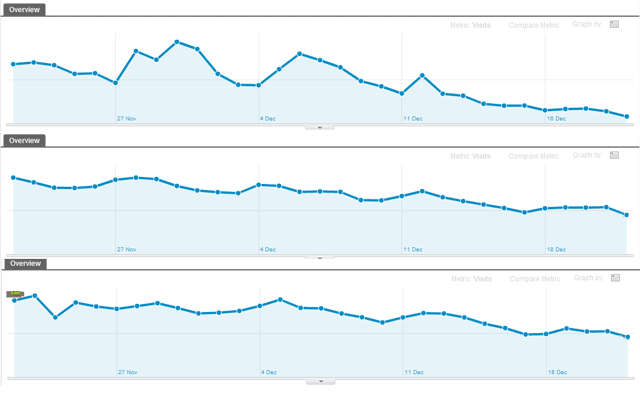
The stats and graphs show how much of us in the UK search less and less going towards xmas day.
I do of course have sites that trend the other way that sell gifts but the above sites don’t sell anything and I consider them as a good overview of UK trends.
So today I log in twitter to get the sexy new interface.. I can’t see much buzz about it on twitter so thought I better blog it here:
Here is the main screen shot:
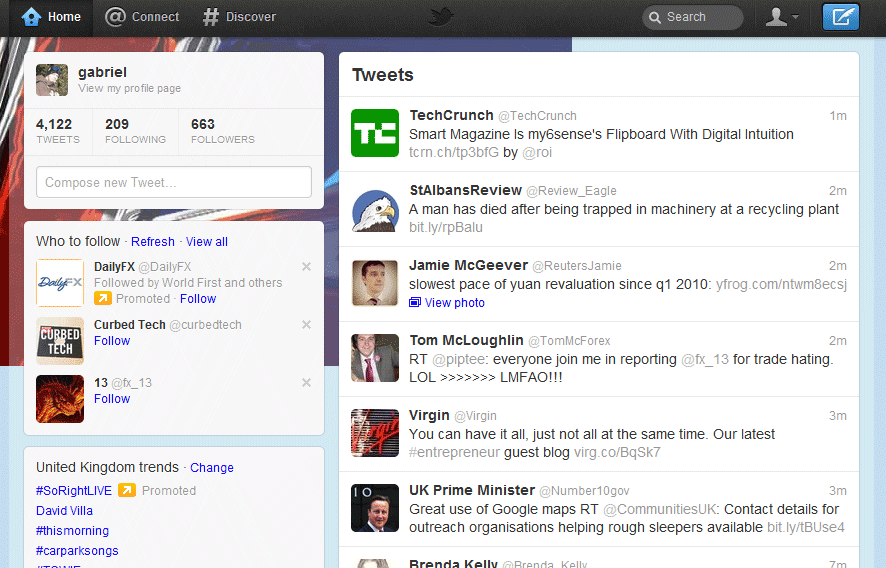 Here is the “new” @connect (same as the twitter iphone ap)

Here is the new “Discover” which is showing trending #tags and or tweets with stories.

Enjoy playing 🙂
Stunning from google… Simply stunning..
Google have updated the new Analytics with visitors flow which a visualises the flow on your site.. Below is a little sample on one of my sites.
The options are the same as all new sections of analytics with flow vs keywords, campaigns etc..

Nothing on http://analytics.blogspot.com/ about this yet and no help doc’s other than one about how google only uses a sample of data..
For me this is great to visually show off to clients what’s working and what’s not..
Yes you can do this in excel but now you don’t need to… Conversion flows are great to show off to a client how well something is working OR that needs more attention.
Hope you enjoy playing with it as much a me..
Using google Analytics “new” interface on a single day view I have a massive bug regarding “Visits” vs “Unique Visitors”
I really can’t work out the numbers google is using? Feel free to comment but this seems to be a “view by day” bug as the weekly/monthly the figure are fine.
Here is the screen shot:
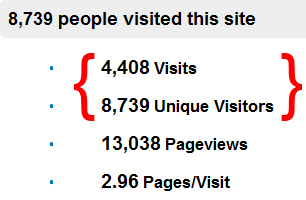
You can see visit are just over half of the Unique visitors which is should be the other way around..
Simple maths shows the Page/visit is working …
Google have updated the UI of the front dashboard page in webmaster tools .
Here is a screen shot:
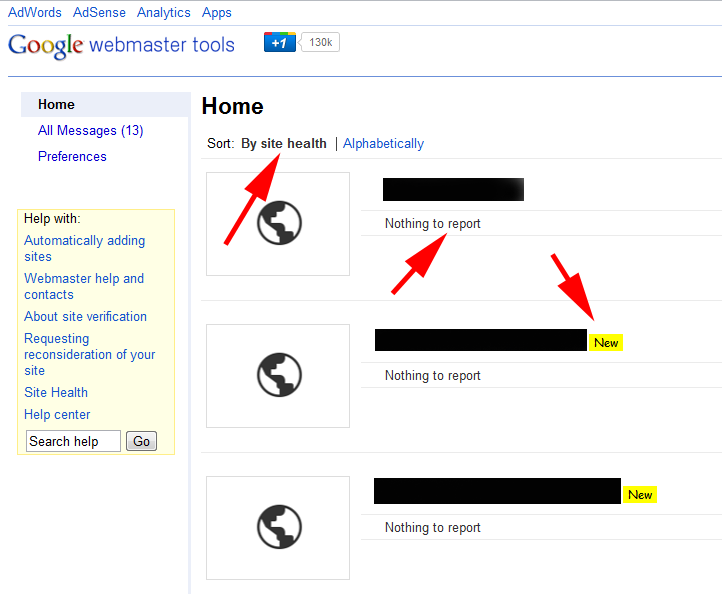
The really interesting thing is the “Sort: By site health” ??? interesting use of the word health….
Also google are showing the word “New” in bright yellow for domain added within (in my case) the last 3 months.. (google will need to confirm this)
I spend hours looking into site analytics, making on site changes and pointing links and testing, testing and more testing looking for impact and trends across loads of sites.
I noticed today that on Friday 22nd July google changed things which has effect the reporting in google Analytics. The impact in one case has had 523% change in traffic source.
The sample below show the difference from the reports of google.com | /imgres AND google.com
[click image to enlarge]
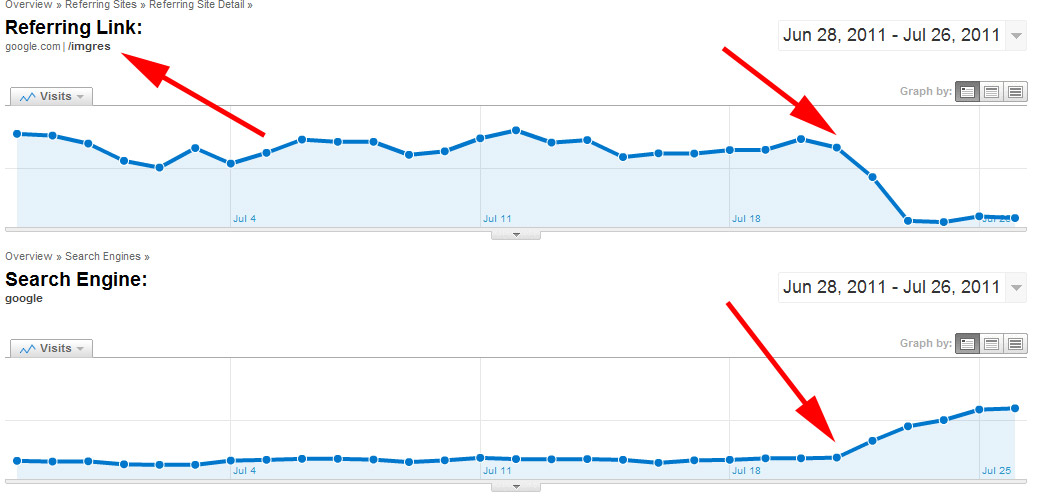
You can see the steep drop off of the referrals from /imgress and the mass upward trend of search referrals from google.
Just looking at referral from google you’d say wow someone has added a really powerful link and i’m ranking for everything under the sun but this is not the case when you compare with the referring charts.
So google images has either changed to now allow Analytics to reports the referral is if it from a search engine OR google Analytics has changed. In my opinion the trend line suggest its a change on google images end that’s been pushed out slowly over 3 days.
The site in question is image heavy with about 40% of all search traffic coming from image results so you can really see the effect.
So if you monitor Analytics and trend please take into account that the change happened on the 22nd July 2011 and completed on 23/24 July 2011.